TV Remote Control
- 4.6
- Rating
- 500.00K
- Installs
- Free
- Price
 Analysis by App-foxy
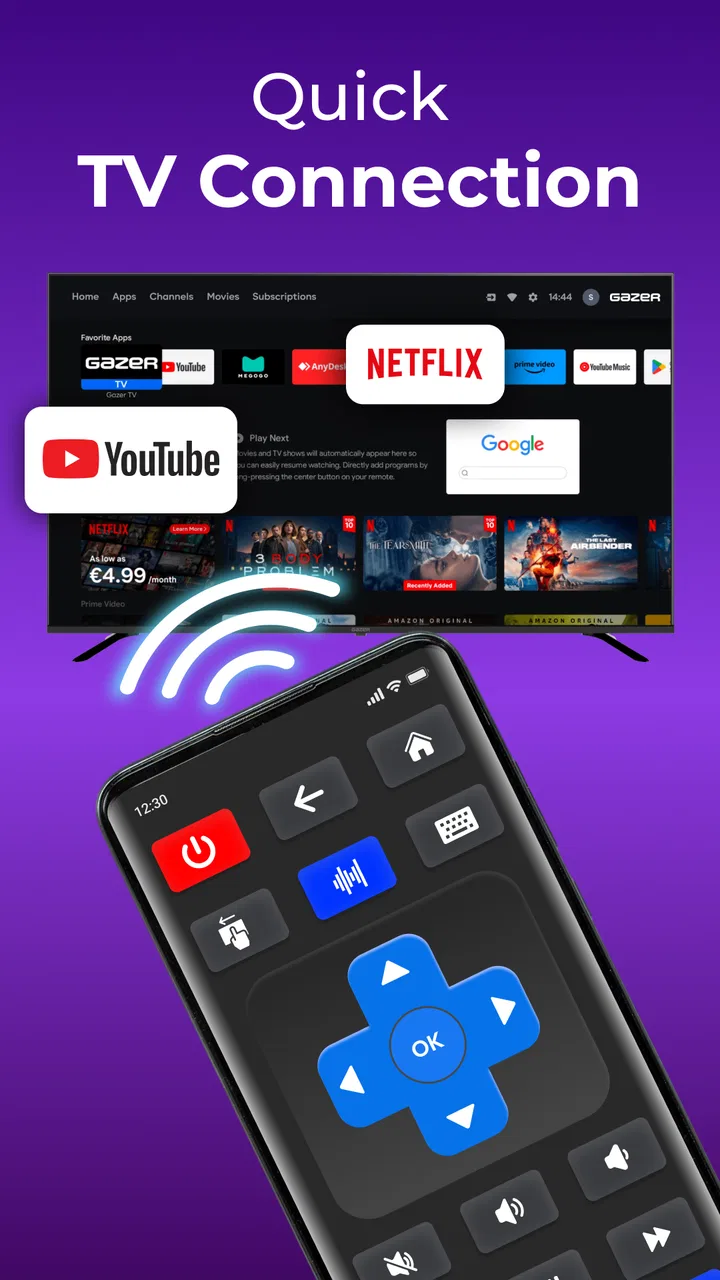
I tried TV Remote Control as the kind of utility you reach for when the physical remote has disappeared under a cushion, the batteries are flat, or somebody else is already holding it. It is a free House & Home app from Galixo.AI that turns a compatible phone into a television remote, with casting, screen mirroring, and voice control included in the overall feature set. That combination makes it more interesting than a simple replacement for volume and channel buttons, although it also means the experience depends heavily on how well your phone, television, and home network cooperate.
My first impression is that this is most useful in a shared home rather than as a novelty installed for occasional experimentation. A household television is rarely controlled by one person at a time. One person may be watching, another may be searching for something to play, and somebody else may need the remote while the phone owner is in another room. A phone-based controller can make those small moments easier, but it also introduces a new question: who gets to control the screen when several people are using it?
How it fits into a shared living room
Imagine a normal evening. I am watching a programme, someone wants to lower the volume, and the physical remote has ended up behind the sofa. With TV Remote Control already installed, the phone can become the quick substitute instead of starting a search through cushions and drawers. That is the clearest everyday benefit, and it does not require changing how the household watches television.
You May Also Like

 Blood Strike: 2.5 Anniversary
Blood Strike’s Loadouts Turn Every Drop Into a Tactical Gamble
A close look at Blood Strike’s custom loadouts: how fast access to signature weapons reshapes its battle royale rhythm, rewards preparation, and narrows the gap between fights.

 Pandora - Music & Podcasts
Pandora’s Music Is Easy to Start, but Harder to Recover
Pandora’s strength is its low-effort path from a seed to a station. Its weak spot is how much confidence it asks you to place in connection, setup, and quiet recovery.

 8 Ball Pool
 Is Built on Rivalries, Rematches, and Routine
A close look at the rivalries, rematches, shared routines, and unanswered safety questions that turn a quick pool match into a persistent mobile community.

 Samsung Music
’s Quiet Strength Is Playing What You Already Own
Its reach comes less from spectacle than from dependable access to a personal library. That simplicity is both the app’s strongest retention engine and its ceiling.

 AccuWeather: Weather Radar
AccuWeather Review: A Quick, Clear Forecast for Everyday Decisions
For everyday plans, the best forecast is the one you can understand quickly. AccuWeather makes rain timing, radar, and local conditions easy to act on, with a few trade-offs.

 Hill Climb Racing
Why Hill Climb Racing Still Turns Crashes Into One More Run
A tiny car, a bumpy hill and one more upgrade: Hill Climb Racing keeps resurfacing because its simple chaos makes every near-miss feel personal.
More From Our News Desk
View All News


The casting and mirroring tools broaden the use case. I could see them being handy when I want to show something from my phone on a larger screen, or when a group is looking at content together and passing around a small display is inconvenient. Voice control may also help when typing with directional buttons feels slow. These features are not merely extra labels; they change the app from a replacement remote into a small collection of ways to interact with a television.
There is a trade-off, though. A physical remote is immediately understandable to everyone in the room. A phone controller belongs to one person at a time, and the person with the phone effectively has control until they hand it over. That can be convenient when one household member is managing playback, but less convenient when children, guests, or partners all expect equal access. I would treat the app as a shared tool that needs a little coordination, not as an automatic replacement for every remote in the house.
The app’s short store description calls it “TV Remote Control,” while its broader summary points to casting, mirroring, and voice interaction. In practice, that distinction matters. Someone looking only for basic power, volume, and navigation may find the extra functions unnecessary. Someone who regularly moves content from a phone to a television may appreciate having those possibilities in the same place. I would decide based on the way your household uses its screen, rather than installing it simply because it has more features.
What I would check before relying on it
The first practical question is compatibility. A phone remote is useful only when it can communicate properly with the television or connected setup. Before making it the household’s main controller, I would test the basics: opening the app, finding the intended screen, adjusting volume, navigating menus, and stopping playback. Then I would try casting or mirroring separately, because those functions may be more sensitive to the particular devices involved than ordinary remote commands.
I would also keep the original remote nearby during the first few sessions. That is not a criticism of TV Remote Control; it is sensible preparation for any phone-based accessory. If the television needs an initial confirmation, if the phone is being used by someone else, or if the network connection is temporarily unhelpful, the physical remote gives the household a fallback instead of turning a small problem into an argument.
Another useful habit is to make sure the phone has enough charge before a long viewing session. A dedicated remote can sit on a table for weeks, while a phone is already handling messages, calls, navigation, and other tasks. If the phone battery is low, using it as the television controller may be the wrong priority. This is one of the less obvious differences between a remote app and the device it replaces.
Setup is simple in concept, but boundaries matter
TV Remote Control is free to install, so the initial decision is low-risk. I would still approach setup in stages. First, establish the basic remote connection. Next, confirm that the television responds consistently. Only after that would I explore voice control, casting, or mirroring. Testing one function at a time makes it much easier to identify whether a problem comes from the app, the television, the phone, or the home connection.
This staged approach is particularly helpful in a household with several screens. If there is a television in more than one room, I would give each connection a clear mental label and avoid assuming that a phone will always be pointed at the screen I mean to control. Accidentally changing the volume or starting playback on another television is the sort of small confusion that can make a useful app feel unreliable, even when the underlying connection is working correctly.
There is also an account boundary worth considering. A phone-based remote is personal by default because it lives on an individual device. If several people want access, each person may need to use their own phone and establish the connection in a way that works for the television. I would not assume that installing the app on one phone automatically creates a household-wide remote. The practical arrangement is to decide who normally manages the connection and when other people should take over.
In a shared home, that decision prevents unnecessary friction. For instance, one person might use the app for casting videos while another keeps the physical remote for ordinary channel changes. That division is perfectly reasonable. The app does not need to control every part of the routine to be valuable; it only needs to make the tasks it handles easier than the alternatives.
Coordinating casting, mirroring, and voice control
The three extended functions deserve different expectations. Casting is generally the most natural choice when I want to send selected content to the television while continuing to use the phone for something else. Mirroring is more direct because it reflects the phone’s display, which can be useful for showing a particular screen to people in the room. Voice control is attractive when entering text or navigating menus with a small directional pad feels tedious.
Those modes should not be treated as interchangeable. If I want everyone to see one item from my phone, mirroring may be the more obvious route. If I want to send content and then return to ordinary phone use, casting may fit better. If I am trying to search without typing character by character, voice control could save time. The best option depends on the task, not on which feature sounds most advanced.
A concrete household workflow would be to use the physical remote for turning the television on, the phone remote for navigating once the screen is ready, and casting when the group agrees on content from someone’s phone. That avoids passing the phone around unnecessarily. It also makes expectations clear: one person controls the current session, while everyone else can suggest what to watch without fighting over the controls.
Mirroring calls for a little more social awareness. Whatever is visible on the phone may appear on the television, so I would close private conversations and unrelated apps before starting it. This is not a special claim about a hidden permission or policy; it is simply good practice whenever a personal screen is being shown to a room full of people. The larger display makes accidental exposure much more noticeable.
Voice control has a similar household consideration. In a noisy room, several people may speak at once, and a command may be misunderstood or addressed to the wrong session. I would use it when one person is clearly managing the television, rather than expecting it to work as a group conversation. The feature can reduce typing, but it does not remove the need for someone to take responsibility for the action.
Who should be trusted with the phone remote?
The age rating is Everyone, which makes the app broadly suitable in an age context. That does not mean every use should be unsupervised or that the app itself replaces household rules. A child using a phone remote may accidentally change the television’s state, interrupt another person’s programme, or mirror something without understanding that the whole room can see it. Those are ordinary shared-device issues, not reasons to reject the app.
I would set a simple rule: the person holding the phone is the session controller, and they should say when they are finished. In a family setting, that is clearer than trying to let everyone issue commands at once. For younger users, I would demonstrate the basic buttons first and explain the difference between controlling the television and showing the phone’s entire screen. That small distinction prevents many avoidable surprises.
Trust also matters with guests. Giving someone the phone to choose a programme is different from letting them use a personal phone that contains messages, photos, or accounts. If I were hosting, I would prefer to operate the app myself or use a spare device dedicated to the television. The app is a remote utility, not a reason to hand over unrestricted access to a personal handset.
For adults sharing a home, the issue is usually convenience rather than supervision. One person may be comfortable with voice control, while another prefers physical buttons. A good arrangement is to keep both options available. TV Remote Control works best when it complements household habits instead of forcing everyone to abandon the method they already understand.
Free access and the point where payment enters
The app is free, with in-app purchases listed from $7.99 to $29.99 per item. That makes it sensible to try the basic experience before deciding whether any paid option is worthwhile. I would not pay immediately just to solve a problem that might actually be caused by device compatibility or a connection issue. First establish that the core remote workflow is useful in your home.
The purchase range also means different users may reach different value judgments. Someone who only needs an emergency remote once every few months may see no reason to spend money. Someone who regularly casts, mirrors, or uses a phone as the main controller may consider additional paid access more reasonable if it improves the particular workflow they use. The important point is to judge payment against repeated household use, not against the novelty of having a remote on a phone.
I would also keep the physical remote available if the app becomes part of daily life. That is not wasted redundancy. It protects against a dead phone battery, a missing handset, or a guest who does not want to install anything. A phone app is flexible, but the dedicated remote remains faster for people who want one-purpose buttons and no setup conversation.
Performance expectations and everyday friction
TV Remote Control has an average rating of 4.4 from around 1.4 thousand ratings, and it has passed 100 thousand installs. Those figures suggest that many people find the concept useful, but they do not guarantee an identical experience in every living room. Remote apps are unusually dependent on the relationship between devices, so I would place more weight on a short personal test than on a general rating.
The current version is 1.1.8, and the app runs on Android 9 or later. That minimum makes the compatibility question straightforward for users with older phones: the operating system needs to meet that requirement before the app can become part of the plan. If a household uses an older spare handset as a dedicated remote, I would check that handset first rather than assuming any available phone will work.
The most likely friction is not the number of buttons but the extra step of reaching for a phone, unlocking it, and opening the right control. A physical remote wins on immediacy. TV Remote Control wins when the physical remote is unavailable, when I want to use phone-based casting or mirroring, or when voice input is more convenient than button-by-button navigation. That is the central trade-off, and it is more useful than calling one option universally better.
Another limitation is social. A phone remote can make one person the gatekeeper of the television. In a home where everyone wants equal control, that may be irritating. I would solve it with a rotation or handoff rule, not by expecting the app to manage household relationships. Technology can make the command easier to send; it cannot decide who should send it.
When another option is the better choice
I would skip this app if all I want is the fastest possible control and the original remote already works well. A dedicated remote has no phone battery concern, no personal-device boundary, and no need to switch between casting, mirroring, and ordinary handset use. For a television used mainly by someone who dislikes smartphone controls, the traditional option is probably kinder.
I would also hesitate to make it the only solution in a home with unreliable connectivity or several people who need simultaneous access. The app’s broader functions are appealing, but a simple remote is often better when the goal is only changing volume or navigating channels. In that situation, installing a feature-rich utility may add complexity without improving the routine.
On the other hand, TV Remote Control is a strong candidate for a household that frequently loses the remote, keeps content on phones, or wants a more convenient way to show a phone screen to a group. It is especially practical when one person naturally acts as the evening’s content organiser. The app then becomes a flexible control centre rather than a button-for-button imitation.
My household verdict
I see TV Remote Control as a useful shared-home helper, provided everyone understands its boundaries. It can rescue an ordinary viewing session when the physical remote is missing, and its casting, mirroring, and voice features give it uses that a basic replacement remote does not have. I like that it can support several different ways of getting content from a phone to a bigger screen, rather than locking the household into one interaction style.
My recommendation is to install it, test the basic remote connection first, and then decide which extended features genuinely fit your routine. Keep the original remote as backup, agree on who controls the phone during group viewing, and be careful when mirroring a personal screen. Those small habits make the experience noticeably smoother.
TV Remote Control is best for people who want flexibility more than absolute simplicity. It is free to try, rated Everyone, and developed by Galixo.AI, but its real value depends on the television setup and the habits of the people sharing it. For a household that wants one person to coordinate viewing from a phone, I would recommend giving it a fair trial. For anyone who only wants instant physical buttons, the familiar remote remains the better answer.
FAQs for TV Remote Control
01What is TV Remote Control and how does it work?
TV Remote Control is a mobile application that lets you control a compatible television from your Android or iOS device. After installing it, you generally connect the phone and TV to the same Wi-Fi network, select the television from the available devices, and use the on-screen buttons for power, volume, channels, navigation, and playback. The exact features depend on your TV model and the app version.
02Which televisions are compatible with TV Remote Control?
Compatibility varies depending on the specific TV Remote Control app and the television manufacturer. Many versions support popular smart TV brands, including models that use Wi-Fi-based remote protocols. Older televisions may require an infrared sensor, which is available only on certain Android phones and is uncommon on iPhones. Before downloading, check the app listing and supported-brand information to confirm that your TV is included.
03Does TV Remote Control require Wi-Fi, Bluetooth, or an infrared sensor?
Most smart TV remote applications use Wi-Fi, requiring both the phone and television to be connected to the same wireless network. Some alternatives use Bluetooth, while others depend on an infrared blaster built into the phone. Connection performance can be affected by guest networks, VPNs, weak signals, or router isolation. The required connection method should be verified before installation.
04Can I use TV Remote Control without the original physical remote?
In many cases, yes, especially if your television is already connected to Wi-Fi and the application can discover it on the same network. However, initial setup may be more difficult if the TV is offline, paired with another network, or waiting for confirmation on its screen. Some televisions allow navigation through the app immediately, while others require a temporary physical remote or manufacturer setup process.
05Is TV Remote Control free and are there any privacy or subscription concerns?
Many TV Remote Control apps can be downloaded for free, but some include advertising, optional subscriptions, or paid features such as advanced controls and ad removal. You should review the permissions requested during setup, particularly access to local network devices. The app should not need unrelated personal information for basic remote functions. Always check the current store listing, privacy policy, and trial terms before subscribing.
Pros
- Works with many popular TV brands and models.
- Simple interface makes basic controls easy to find.
- Useful replacement when the physical remote is missing.
- Quick access to volume
- channels
- input
- and power controls.
- Usually requires no extra hardware when paired with a compatible TV.
Cons
- Compatibility may vary significantly between TV models.
- Some features require the TV and phone to share a Wi-Fi network.
- Advertisements can interrupt use in the free version.
- Advanced controls may be unavailable on certain televisions.
- The phone must remain charged and connected for reliable use.

TV Remote Control
Gallery